> ## Documentation Index
> Fetch the complete documentation index at: https://docs.near-intents.org/llms.txt
> Use this file to discover all available pages before exploring further.
# Verifier Contract
> The on-chain settlement layer for NEAR Intents
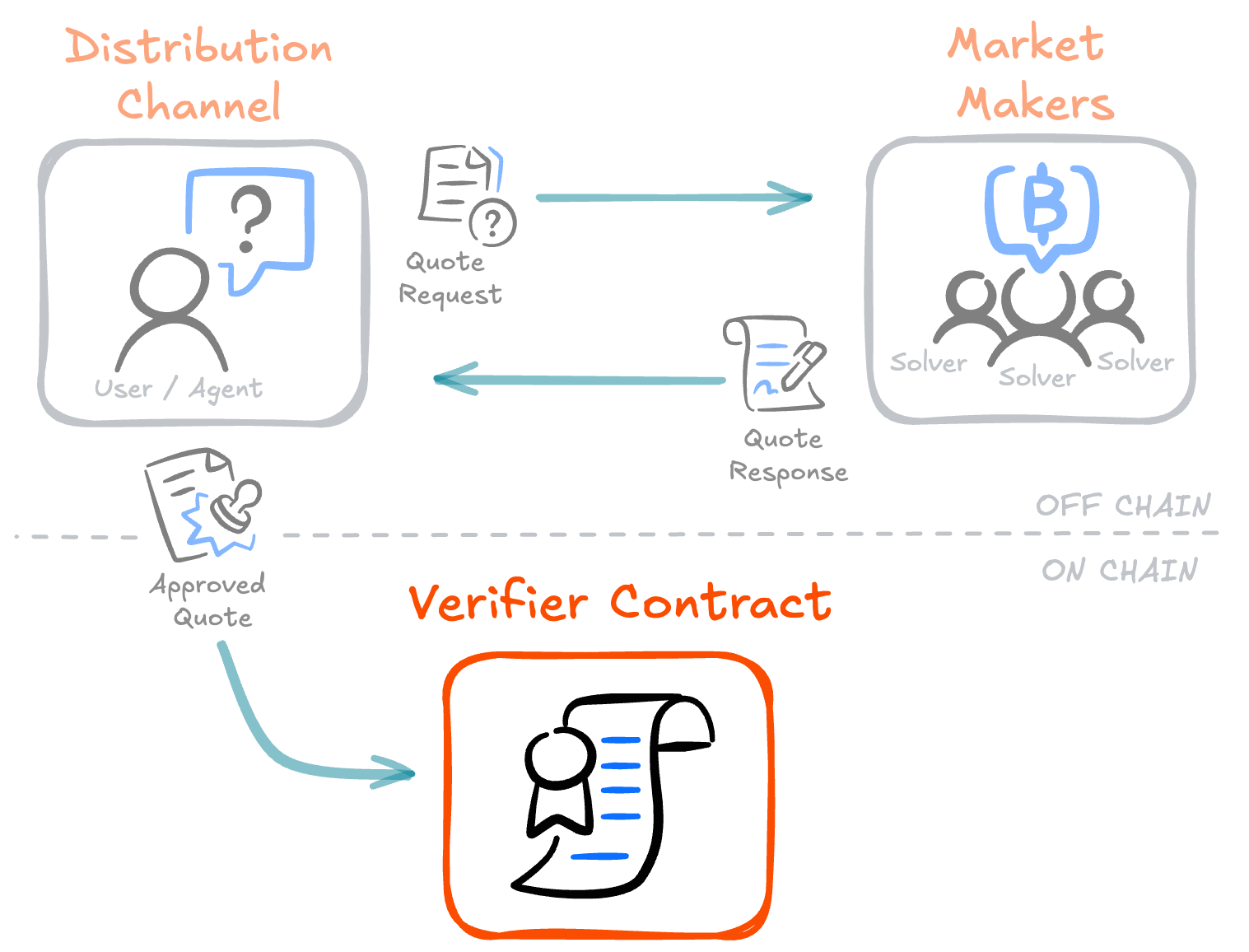
 The Verifier Smart Contract is the on-chain settlement layer for NEAR Intents. It operates as an internal ledger, tracking token balances for all participants. Swaps and transfers happen within the contract's balance records, and actual movement of tokens to external chains occurs only on withdrawal through [token bridges](/integration/bridging/overview).
The typical flow is:
1. **Deposit** tokens into the Verifier contract. The contract tracks your balance internally. *(See [Deposits](/integration/verifier-contract/deposits-and-withdrawals/deposits))*
2. **Swap or transfer** by submitting intents. Users express their "intent" to perform a transaction (e.g., exchange USDT for USDC, or transfer tokens to another user). Intents can be submitted directly or bundled together by a third party like the Message Bus for atomic execution. *(See [Intent Types](/integration/verifier-contract/intent-types-and-execution))*
3. **Withdraw** tokens to your NEAR account or external chain. For external chain asset transfer, the Verifier settles the withdrawal through the appropriate token bridge, delivering tokens to the destination address. *(See [Withdrawals](/integration/verifier-contract/deposits-and-withdrawals/withdrawals))*
## Who is this documentation for?
Most applications integrating token swaps do not need to interact with the Verifier contract directly. The [1Click Swap API](/integration/distribution-channels/1click-api/about-1click-api) handles intent creation, market maker coordination, and execution.
This section is for developers who need lower-level control and want to:
* Interact with the Verifier smart contract directly
* Create payloads for the [Message Bus](/integration/market-makers/message-bus/introduction) (a matching system that brings together quotes from market makers with transaction requests)
## Prerequisites
Before working directly with the Verifier contract, you should have:
* A [NEAR account](https://docs.near.org/tutorials/protocol/create-account) (named account like `yourname.near` or implicit account)
* Tokens to deposit (fungible tokens like USDC, USDT, or wrapped NEAR)
* Basic understanding of [NEAR transactions](https://docs.near.org/concepts/protocol/transactions) and [cross-contract calls](https://docs.near.org/smart-contracts/anatomy/crosscontract)
* Familiarity with JSON and digital signatures
If you're new to NEAR, start with the [NEAR documentation](https://docs.near.org/) to understand accounts, transactions, and the basics of smart contract interaction.
## Deployment
The Verifier smart contract is deployed at [`intents.near`](https://nearblocks.io/address/intents.near).
There is no testnet deployment. Use small amounts for testing purposes.
## Source code
The contract is open source. You can find it on GitHub:
View the source code for the Verifier smart contract
The former name of the smart contract is "Defuse". You may still see this name in some places in the codebase. It is planned to be updated in the future.
## Next steps
Learn about account identification and key management
Learn how to deposit and withdraw tokens
Explore available intent types and how to structure them
Understand how to sign intents for different wallet types
The Verifier Smart Contract is the on-chain settlement layer for NEAR Intents. It operates as an internal ledger, tracking token balances for all participants. Swaps and transfers happen within the contract's balance records, and actual movement of tokens to external chains occurs only on withdrawal through [token bridges](/integration/bridging/overview).
The typical flow is:
1. **Deposit** tokens into the Verifier contract. The contract tracks your balance internally. *(See [Deposits](/integration/verifier-contract/deposits-and-withdrawals/deposits))*
2. **Swap or transfer** by submitting intents. Users express their "intent" to perform a transaction (e.g., exchange USDT for USDC, or transfer tokens to another user). Intents can be submitted directly or bundled together by a third party like the Message Bus for atomic execution. *(See [Intent Types](/integration/verifier-contract/intent-types-and-execution))*
3. **Withdraw** tokens to your NEAR account or external chain. For external chain asset transfer, the Verifier settles the withdrawal through the appropriate token bridge, delivering tokens to the destination address. *(See [Withdrawals](/integration/verifier-contract/deposits-and-withdrawals/withdrawals))*
## Who is this documentation for?
Most applications integrating token swaps do not need to interact with the Verifier contract directly. The [1Click Swap API](/integration/distribution-channels/1click-api/about-1click-api) handles intent creation, market maker coordination, and execution.
This section is for developers who need lower-level control and want to:
* Interact with the Verifier smart contract directly
* Create payloads for the [Message Bus](/integration/market-makers/message-bus/introduction) (a matching system that brings together quotes from market makers with transaction requests)
## Prerequisites
Before working directly with the Verifier contract, you should have:
* A [NEAR account](https://docs.near.org/tutorials/protocol/create-account) (named account like `yourname.near` or implicit account)
* Tokens to deposit (fungible tokens like USDC, USDT, or wrapped NEAR)
* Basic understanding of [NEAR transactions](https://docs.near.org/concepts/protocol/transactions) and [cross-contract calls](https://docs.near.org/smart-contracts/anatomy/crosscontract)
* Familiarity with JSON and digital signatures
If you're new to NEAR, start with the [NEAR documentation](https://docs.near.org/) to understand accounts, transactions, and the basics of smart contract interaction.
## Deployment
The Verifier smart contract is deployed at [`intents.near`](https://nearblocks.io/address/intents.near).
There is no testnet deployment. Use small amounts for testing purposes.
## Source code
The contract is open source. You can find it on GitHub:
View the source code for the Verifier smart contract
The former name of the smart contract is "Defuse". You may still see this name in some places in the codebase. It is planned to be updated in the future.
## Next steps
Learn about account identification and key management
Learn how to deposit and withdraw tokens
Explore available intent types and how to structure them
Understand how to sign intents for different wallet types