> ## Documentation Index
> Fetch the complete documentation index at: https://docs.near-intents.org/llms.txt
> Use this file to discover all available pages before exploring further.
# Token Swaps
> Integrate cross-chain token swaps into your application
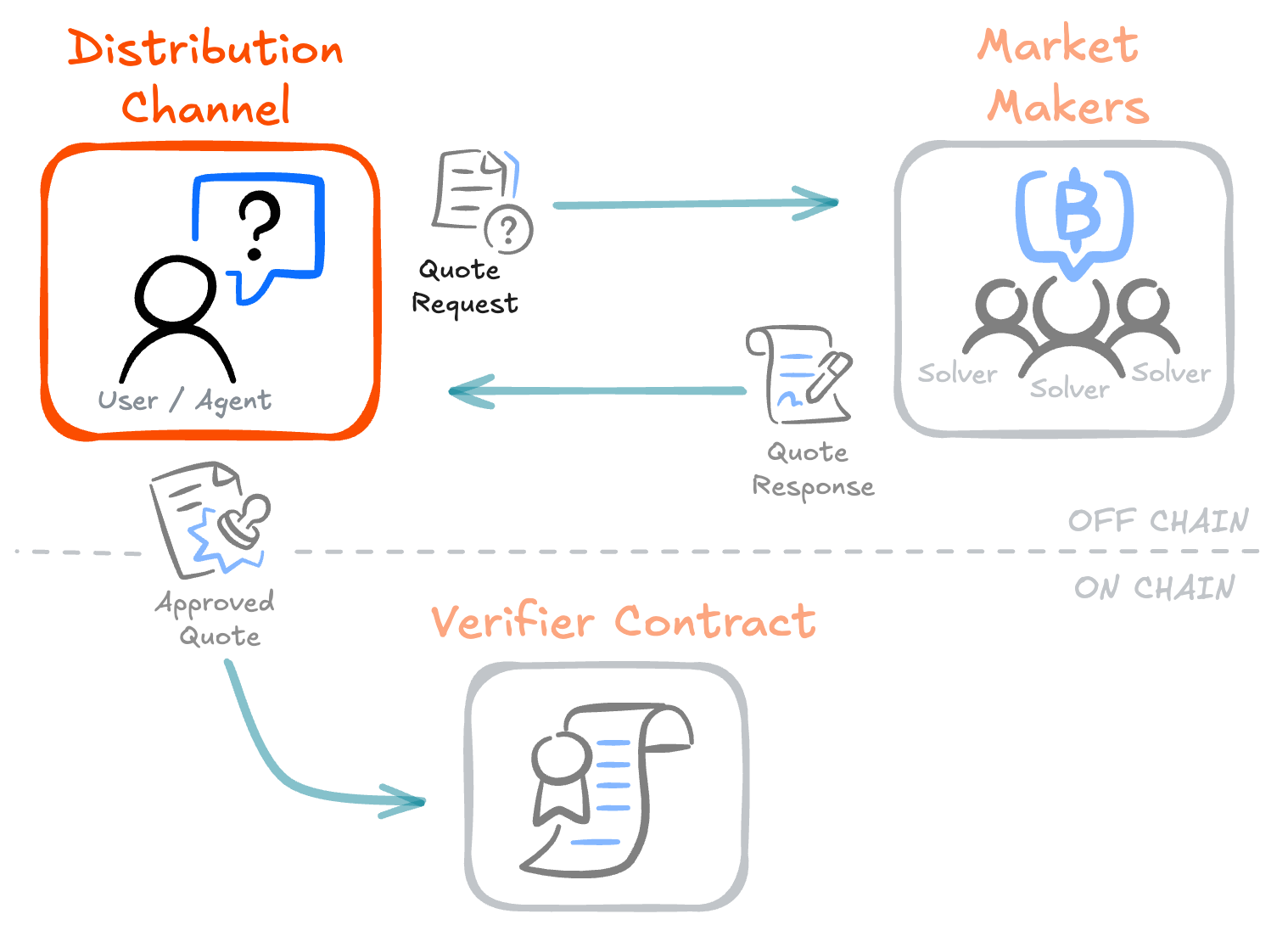
Token swaps on NEAR Intents are delivered through **distribution channels** — user-facing applications, wallets, and exchanges that integrate cross-chain swaps. Distribution channels handle intent creation, management, and asset delivery, while [Market Makers](/integration/market-makers/introduction) handle fulfillment and pricing.
 ## 1Click Swap API
The **1Click Swap API** is a REST API that handles intent creation, market maker coordination, and transaction execution. It is the recommended way to build a distribution channel.
Get started with the recommended integration path
## Explorer API
The **Explorer API** provides endpoints for querying transaction history and status. Use it to track swaps, build dashboards, or surface transaction receipts in your application.
Query transaction history and swap status
## Direct Integration
For advanced use cases, you can build low level integrations directly with the [Verifier Contract](/integration/verifier-contract/introduction). This gives you full control over intent creation and on-chain execution.
## Next Steps
Learn how the 1Click API works and get started
Register for authenticated API access
Set up fee collection for your integration
Query transaction history and swap status
## 1Click Swap API
The **1Click Swap API** is a REST API that handles intent creation, market maker coordination, and transaction execution. It is the recommended way to build a distribution channel.
Get started with the recommended integration path
## Explorer API
The **Explorer API** provides endpoints for querying transaction history and status. Use it to track swaps, build dashboards, or surface transaction receipts in your application.
Query transaction history and swap status
## Direct Integration
For advanced use cases, you can build low level integrations directly with the [Verifier Contract](/integration/verifier-contract/introduction). This gives you full control over intent creation and on-chain execution.
## Next Steps
Learn how the 1Click API works and get started
Register for authenticated API access
Set up fee collection for your integration
Query transaction history and swap status